
AppGyver

While the world is moving towards digitalization, most users these days are using mobile phones for their daily tasks. So, if you are thinking of creating a digital presence, then having an application is a better solution depending on the type of users you are targeting.
Although doing so will bring many benefits, it will also make the process complex for you because app development needs professional development skills.
However, some platforms allow you to develop stunning applications without needing to code, and AppGyver is one of them.
AppGyver Overview
Every business needs an application to be full of features and perform very well. Well, AppGyver is that exact platform that lets you create all of this without needing to deal with complex coding environments., You can create internal applications for mobile forms, data collection, and even for managing workflow automation.
All of it is possible with Composer Pro provided by AppGyver, which is the world’s first professional platform for no-code development of applications for all platforms.
AppGyver Core Features
Being a no-code app development platform is not everything you will be getting from AppGyver. IT comes with many other unique features that add to the overall value you will be getting from AppGyver. So, here are some of the features you can get from AppGyver.
- API integration under minutes increases productivity
The Composer Pro comes with a REST integration wizard. It can let you integrate any API with your application within minutes. Not only this, but a selection of APIs will not be an issue for you as there are many pre-built APIs available in the AppGyver marketplace. So, all you need to do is add your API key, and you will be good to go.
- Native performance
Developing an application that is not native but provides native performance is almost opposable. However, it is not impossible with AppGyver. When you use Composer Pro, you can build applications that are highly optimized for the operating systems.
Not only this, but these applications have access to all their native features and device capabilities, meaning you will get the best experience.
- Unlimited logic means there is nothing you will miss.
There are many no-code or low-code app development [platforms, but most of them have only a limited set of logic. It is not the case with AppGyver, as there are hundreds of logic functions.
So, whether you are looking to apply some math or engineering logic, array operations, or some UI logic, you will not be limited when you use AppGyver.
- The ability to create a pixel-perfect design
AppGyver Composer Pro is not only excellent when it comes to the backend features, but the UI designing is also excellent here. When you use it, you never have to compromise on the UI design of your application, as you can easily control and customize everything according to your needs.
AppGyver Advantages
With all of the fantastic features, there are some advantages that AppGyver provides you. Although there are a lot of them, here we will be mentioning some of them.
- More than 500 components are available, so you can get something for all aspects of your application.
- A powerful theme engine lets you use components from a vast library of components, and you can mix and match them to get the best appearance.
- One app runs on all platforms meaning you only need to do the no-code development once, and your application will run on all devices from phones to smart TVs.
AppGyver Pricing
When you start with AppGyver, you will see that the Composer Pro is free for signup. However, the interesting part here is that it is completely free for life.
All the organizations that have less than $10 million in their revenue can use it for free for a lifetime which means it will be the best option.
One may think that there must be some features which will be lacking here because of being free. It is not the case here as you get everything you need including a hobby database and CDN.
In addition to this, you can also use third-party backends with the applications developed here for both your commercial and non-commercial applications. It means whatever you need, there are no limits.
Conclusion
As application development is getting complex with every new technology and feature, most businesses are unable to have a mobile app.
AppGyver is that platform that takes care of this issue by providing a development environment where you do not need to use any programming languages.
Here we were discussing how this no-code app development works great with its features and benefits.
FAQ
What is AppGyver?
Professional no-code platform to create apps for mobile and web.
What are the features of AppGyver?
– Pixel Perfect Design
– Native Performance
– Unlimited Logic
What is the pricing of AppGyver?
– Free for companies up to $10 million in revenue
What is the composer Pro ?
AppGyver, a startup that has been on the forefront of low-code development since it first launched in 2013, today launched the latest version of its visual development platform. This update, dubbed Composer Pro, has been three years in the making and promises to overcome many of the limitations of today’s low-code environments. It allows developers to build applications for the web, PC, Mac, iOS and Android, using React Web and React Native — and can be extended with plugins for those frameworks. And unless you are a large organization, Composer Pro is available for free — and that includes the ability to use the platform’s database service, CDN and publishing tools.
“We want the Composer Pro to be used to really remove the last limitations of no-code and making no-code as powerful as writing code. That’s what it comes down to and that’s when a whole new world opens,” Marko Lehtimaki, the company’s CEO and co-founder, told me.
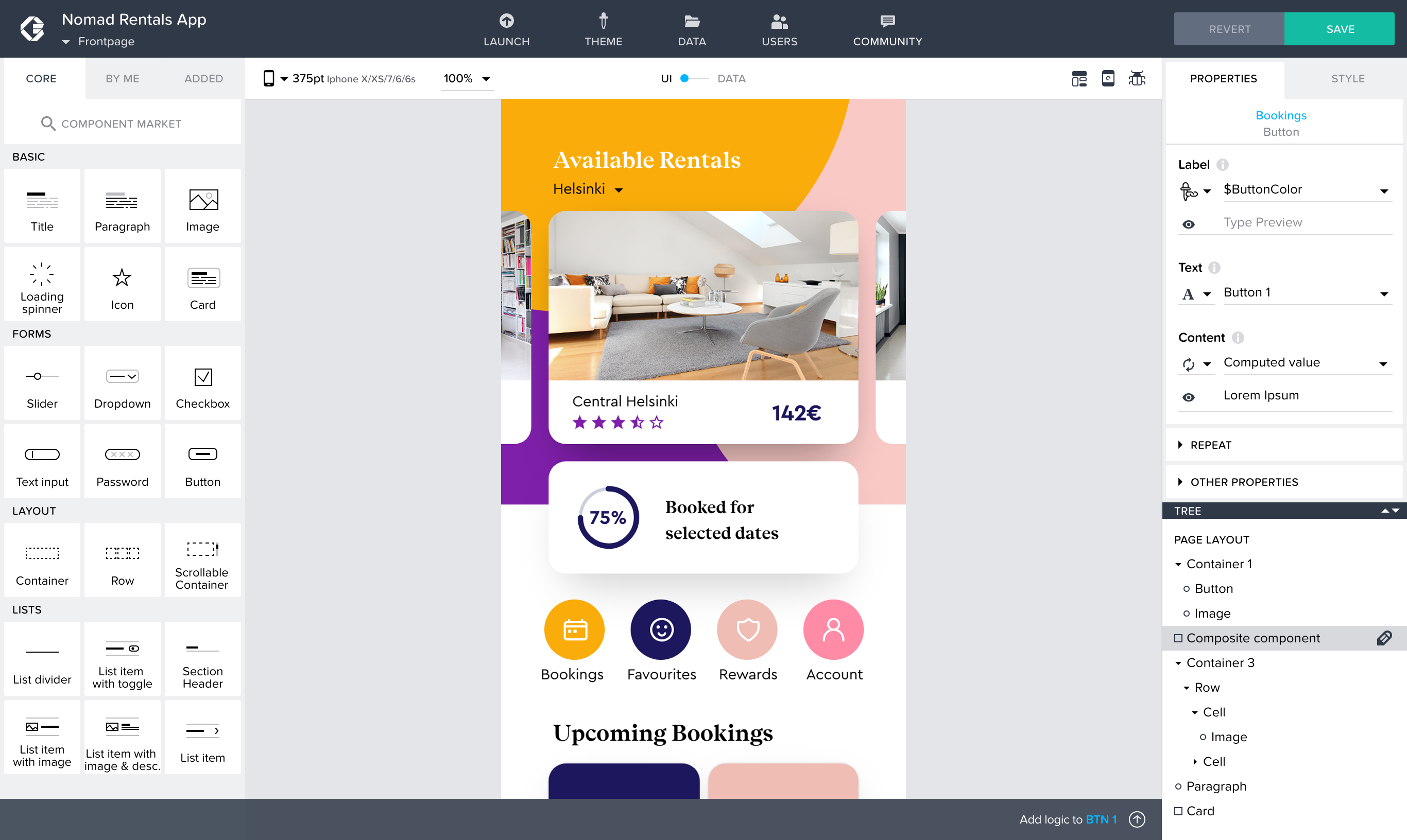
As Lehtimaki told me, the company already has plenty of enterprise customers and is cash-flow positive, so with all investors aligned, the team decided that it could give away its platform for free to individual developers, schools and startups. The company’s more than 100 enterprise users currently include the likes of DHL and Fingrid.
While the core of the service is obviously the visual editor, a lot of the platform’s power resides in its tools for visually creating logic functions and managing your database, for example. As expected, Composer Pro offers plenty of pre-built UI components and logic flow blocks for building your first application. The company is also creating a marketplace where developers can share (and potentially sell) their own components.
“After releasing Composer 2, we laid out a vision for what we wanted to do next and this was really at the core of it,” Lehtimaki said. “How do we bring the same level of expression of programming languages to visual development? Basically what we thought that this means is that in practice, everybody likes building blocks and to create these big, complex structures, but we wanted to make it possible to create those building blocks themselves without any line of code so that there would be no place where you would ever need to add code.”
While previous versions of the service made an early bet on HTML5, the team is now all-in on React and React Native. The company argues that it has spent a lot of time on optimizing the code it creates, beyond what most developers are able to do to optimize their own React Native projects. With that, the company can now take the same code base, with an adaptive design on top, and build apps for virtually any modern platform.
Sumber : Jessica Clark , Frederic Lardinois